Key Takeaways
- QuickBooks Online lacks native trust accounting safeguards, exposing law firms to bar discipline and IOLTA violations that can cost an average of $87,000 per incident.
- The best QuickBooks alternatives for law firms (CosmoLex, Clio Accounting, MyCase, and others) combine matter-based billing, three-way reconciliation, and compliance reporting in one place.
- Switching software alone does not fix compliance: a legal-trained virtual bookkeeper ensures accurate data entry, clean ledgers, and audit-ready records regardless of which platform you use.
- Firms that pair purpose-built legal accounting software with a dedicated virtual bookkeeper get the strongest combination of technology and human oversight.
QuickBooks Online is one of the most recognizable accounting platforms in the world, but it was built for coffee shops, contractors, and retail businesses. Law firms are not general businesses. They operate under strict ethical rules that govern how client money is handled, tracked, and reported.
The result? Thousands of firms use QuickBooks and unknowingly create compliance exposure every month. Sync errors between practice management tools and QBO lose billable hours. Trust account data sits in spreadsheets that no bar examiner wants to see. And attorneys spend weekends reconciling numbers instead of preparing for Monday's hearings.
This guide breaks down why QuickBooks falls short, which legal-specific alternatives actually address the gap, and why the smartest firms pair purpose-built software with a legal-trained virtual bookkeeper.
Why QuickBooks Fails Law Firms
Law firm accounting has two requirements that set it apart from almost every other small business, plus a third problem that appears when QuickBooks is paired with practice management software.
1. Trust accounting
Client money held before it's earned must sit in a separate IOLTA or trust account. It has to be tracked by client and by matter, and reconciled three ways: the bank statement, the firm's trust ledger, and the total of every individual client ledger.
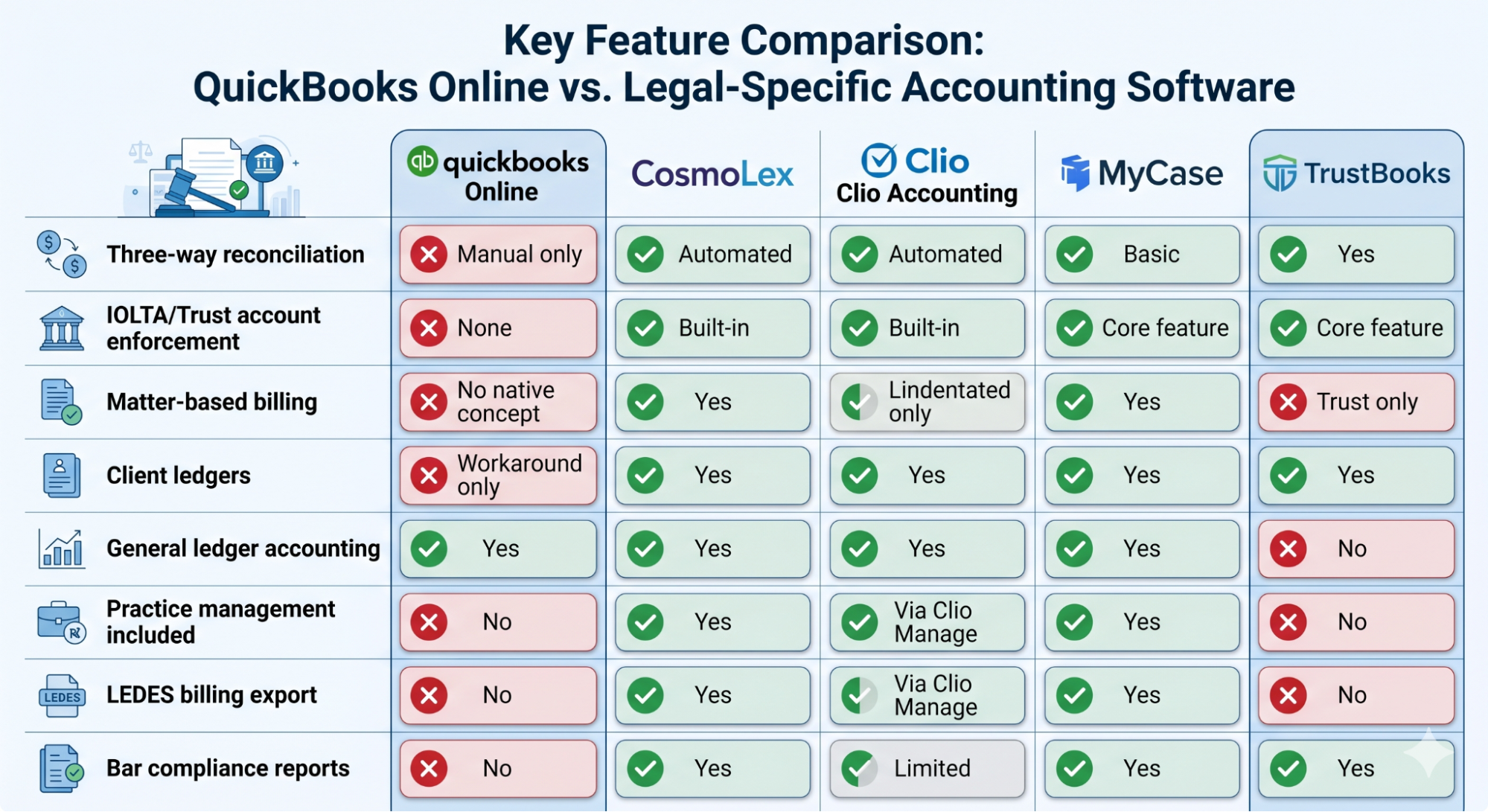
To be fair to QuickBooks, it can record that money. Intuit's law firm page says you can track trust and general retainers in your chart of accounts according to your state's rules. The problem is what QuickBooks trust accounting does not do on its own:
- It doesn't stop you from spending one client's money on another client's matter.
- It doesn't warn you when an individual client balance goes negative.
- It doesn't produce a three-way reconciliation report.
Those safeguards are the point of trust accounting. Without them, compliance depends on manual workarounds and someone remembering to check. The ABA Model Rule 1.15 on safekeeping client property sets the baseline that state rules build on.
2. Matter-based billing
Every billable hour, expense and payment in a law firm ties to a specific matter, not just a client. QuickBooks has no native matter concept. Firms that imitate one with classes, projects or sub-customers end up with workarounds that are easy to break and hard to defend in an audit.
3. Integration friction
Many firms pair QuickBooks with a practice management tool such as Clio or PracticePanther. That setup works until the sync doesn't. Mis-posted time entries, duplicate expenses and mismatched trust records then eat staff hours every month.
Lawyers can't spare that time. Clio's Legal Trends Report found in 2023 that 63% of the workday goes to non-billable work. Reconciling two disconnected systems only adds to it.
The Real Cost of Non-Compliant Trust Accounting
Bar discipline is not hypothetical. A study by Legal Management Resources analyzed trust account violations at 130 small to mid-sized law firms and found the average total cost of a major trust account violation reached approximately $87,000, with less than 20% of that figure coming from direct regulatory fines. The rest? Client loss, legal defense costs, mandatory audits, and reputational damage.
State bar associations in California, Florida, Texas, and New York either mandate or strongly recommend monthly three-way reconciliation. Disciplinary records consistently identify reconciliation failures as one of the most common triggers for investigation.
No version of QuickBooks automates three-way reconciliation or enforces the separation of operating and trust funds. For a firm handling any volume of client retainers, using general accounting software is a compliance risk, not just an inconvenience.
Best QuickBooks Alternatives for Law Firms (2026)
The legal software market has matured significantly. The U.S. legal technology market was valued at $7.3 billion in 2024 and is projected to grow at a 7% CAGR through 2033, according to Grand View Research. Legal-specific accounting solutions now offer capabilities that general accounting tools simply cannot match.
Here are the leading QuickBooks alternatives built for law firm compliance:
CosmoLex
CosmoLex is one of the most recognized QuickBooks replacements in the legal industry. It integrates billing, general ledger accounting, and trust accounting in a single platform, eliminating the need for a separate accounting tool. Its trust module enforces three-way reconciliation, maintains client-by-client ledgers, and generates compliance-ready reports. CosmoLex also includes matter management, making it a combined practice management and accounting solution for small to mid-sized firms.
Best for: Solo practitioners and small firms that want an all-in-one replacement with strong trust accounting out of the box.
Clio Accounting
Clio added its own accounting module in 2024, bringing general ledger functionality directly into the Clio Manage environment. For firms already on Clio, it eliminates the sync problem entirely. The limitation: Clio Accounting currently operates on a cash-basis only and offers just six core financial reports. Firms with accrual accounting needs or complex reporting requirements will find it underpowered.
Best for: Current Clio users who want to consolidate billing and accounting without migrating platforms.
MyCase
MyCase includes built-in accounting with IOLTA trust account management, client ledgers, and reconciliation tools. Its strength is usability: attorneys and staff who are not financial professionals can navigate it without extensive training. MyCase also includes client portal features, intake workflows, and document management.
Best for: Small to mid-sized general practice firms that prioritize ease of use alongside compliance.
Tabs3
Tabs3 is one of the oldest and most established legal accounting platforms, with deep trust accounting functionality. It remains a preferred choice for firms with complex billing arrangements (contingency fees, split billing, and multi-tiered rate structures) that simpler platforms cannot handle. Tabs3 integrates with PracticeMaster for full practice management coverage.
Best for: Mid-sized to larger firms with complex billing and long-standing bookkeeping workflows.
TrustBooks
TrustBooks is unique in that it focuses exclusively on trust accounting. It does not try to replace your general accounting software; it fills the specific compliance gap that QuickBooks cannot. For firms that want to keep QuickBooks for general business accounting while adding a compliant trust accounting layer, TrustBooks is a targeted solution.
Best for: Firms that want to retain QuickBooks for non-trust accounting but need a dedicated, bar-compliant trust module.
Key Feature Comparison
Should You Keep QuickBooks and Add a Trust Layer?
Sometimes, yes. QuickBooks for law firms works when it isn't asked to do the trust accounting itself. The common setup is QuickBooks for operating accounts, payroll and taxes, plus a legal tool such as TrustBooks or a QuickBooks-based billing platform like LeanLaw for trust and matter billing.
This setup is reasonable when:
- your outside accountant or CPA is deeply invested in QuickBooks and prefers to keep it;
- your trust activity is light, with a modest number of retainers each month;
- you're a solo or very small firm with straightforward hourly or flat-fee billing.
It's usually the wrong choice when:
- you hold significant trust balances or settlement funds across many clients;
- several attorneys and staff record time and trust transactions;
- sync errors between systems are already costing staff time every month.
Either way, the rule is the same: QuickBooks should never be the system of record for client trust balances. Something purpose-built has to hold the client ledgers and produce the three-way reconciliation.
How to Choose the Right Alternative
The right choice depends on three variables:
Your current tech stack
If your firm is already on Clio, adding Clio Accounting has zero migration cost and eliminates sync errors. If you are starting fresh or fully replacing QBO, CosmoLex or MyCase give you practice management and accounting in one subscription.
Your billing complexity
Contingency fees, split billing, and LEDES e-billing requirements push you toward Tabs3 or CosmoLex. Straightforward hourly billing works well in MyCase or Clio.
Your trust account volume.
Any firm handling retainers (which is most firms) needs software with automated three-way reconciliation and per-client trust ledgers. If your current platform does not generate a compliance-ready reconciliation report on demand, you have a risk gap.
One factor all firms should weigh: the legal services industry is growing at 4.5% annually, according to Bookkeeper.law's analysis of industry data. More growth means more client funds flowing through trust accounts, and more exposure if compliance controls are inadequate.
How to Switch from QuickBooks Without Breaking Your Trust Records
The golden rule: never migrate unreconciled books. Move at a month-end, right after a clean three-way reconciliation, so your opening balances are numbers you can defend.
- Reconcile trust three ways in QuickBooks first. Bank statement, trust ledger and the sum of client ledgers must match to the cent. If they do not, fix that before anything moves.
- Pick a cut-over date. Use the last day of a month, ideally a quarter.
- Export what the new system needs. Chart of accounts, open receivables, vendor list, and client trust balances by matter as of the cut-over date.
- Import and re-reconcile. Load opening balances into the new system and run a three-way reconciliation there before recording anything new.
- Run one cycle in parallel. Record the first month in both systems and compare. Differences reveal mapping errors early.
- Archive QuickBooks read-only. Keep it accessible for your state's record-retention period; do not keep posting to it.
Why Software Alone Is Not Enough
Here is what legal software vendors do not tell you: compliance-ready software is only as good as the people entering data into it.
A law firm can deploy the most sophisticated trust accounting platform on the market and still face a bar complaint because:
- Deposits were coded to the wrong matter
- Fees were transferred before they were earned
- Reconciliation was done inconsistently or skipped during busy months
- No one reviewed the three-way reconciliation for accuracy before it was filed
This is where a legal-trained virtual bookkeeper changes the equation.
At Bookkeeper.law, every virtual bookkeeper on the platform is trained specifically in legal finance: trust accounting rules, IOLTA requirements, client ledger management, and bar compliance reporting. They work inside your existing software, whether that is CosmoLex, Clio, MyCase, or any other platform you choose.
The practical result:
- Trust transactions recorded correctly, to the right matter and the right ledger, from day one
- Three-way reconciliations completed monthly, or more frequently if your jurisdiction recommends it
- Audit-ready records organized and accessible if your bar association ever comes knocking
- Billable vs. non-billable hour analysis so you can see where revenue is leaking
- Accounts payable and receivable managed without pulling attorney time away from casework
Virtual bookkeeping for law firms also solves a cost problem that software switching alone cannot. Hiring an in-house bookkeeper with legal accounting expertise costs between $55,000 and $75,000 annually in most U.S. markets, once you factor in salary, benefits, office space, and training. A virtual bookkeeper through Bookkeeper.law delivers the same specialized expertise at a fraction of that cost, with no recruiting lag and no onboarding overhead.
Think of it this way: the right legal accounting software removes the compliance risks QuickBooks creates. A legal-trained virtual bookkeeper ensures those risks stay removed, month after month.
Stop Managing Books That Were Never Built for You
QuickBooks was not designed with your bar association in mind. It does not know what three-way reconciliation means, it cannot enforce IOLTA fund separation, and it has no concept of a legal matter. Every month your firm uses it for trust accounting is a month your compliance depends on manual workarounds and human memory.
The alternatives covered in this guide (CosmoLex, Clio Accounting, MyCase, Tabs3, and TrustBooks) each address those gaps in different ways, for different firm sizes and billing models. The right choice is the one that fits your current stack, your billing complexity, and your trust account volume.
But the firms that actually stay out of trouble do one more thing: they pair that software with a legal-trained bookkeeper who understands trust accounting rules, executes reconciliations consistently, and keeps records that can withstand scrutiny.
Bookkeeper.law provides certified virtual bookkeepers trained exclusively in legal finance. Whether you are migrating from QuickBooks, starting fresh on a new platform, or simply want clean books and confident compliance, the team at Bookkeeper.law can be up and running alongside your firm in as little as one to three business days.
Book a free consultation with Bookkeeper.law →

Frequently Asked Questions
Can QuickBooks be used for law firm trust accounting?
QuickBooks Online does not have built-in trust accounting safeguards. It cannot automatically enforce the separation of client funds from operating funds, does not generate bar-compliant three-way reconciliation reports, and has no native matter-based billing concept. Some firms use QuickBooks for general accounting and pair it with a dedicated trust accounting tool like TrustBooks, but this creates a two-system setup with its own reconciliation risks. Purpose-built legal accounting software is the more reliable path for firms handling any volume of client retainers.
What is the difference between legal accounting software and QuickBooks?
Legal accounting software is built around the specific workflows law firms require: IOLTA trust accounts, client-by-client ledgers, matter-based time and expense tracking, three-way reconciliation, and bar compliance reporting. QuickBooks is a general small business accounting platform designed for invoicing, payroll, and expense tracking without the legal-specific compliance layer. The gap becomes consequential whenever a law firm holds client funds or needs to produce records for a bar association audit.
How much does it cost to switch from QuickBooks to legal accounting software?
Costs vary by platform and firm size, but most legal accounting platforms price between $49 and $149 per user per month, which is often comparable to or slightly above a mid-tier QuickBooks Online subscription. The more meaningful cost consideration is the productivity gained by eliminating manual reconciliation between disconnected tools, reducing compliance risk, and centralizing billing and accounting in one platform. Most firms recover the cost difference within the first year through time savings and fewer billing errors.
Do law firms need a bookkeeper if they use legal accounting software?
Yes. Legal accounting software provides the compliance framework, but it requires accurate, consistent data entry and monthly reconciliation to function as intended. A virtual bookkeeper trained in legal finance ensures that trust transactions are coded correctly, reconciliations are completed on time, and records are audit-ready. Many firms that switched to compliant software but did not update their bookkeeping processes still faced bar complaints because procedures were not followed. The software and the person operating it work as a system, not as substitutes for each other.